
TechCrunch Colors
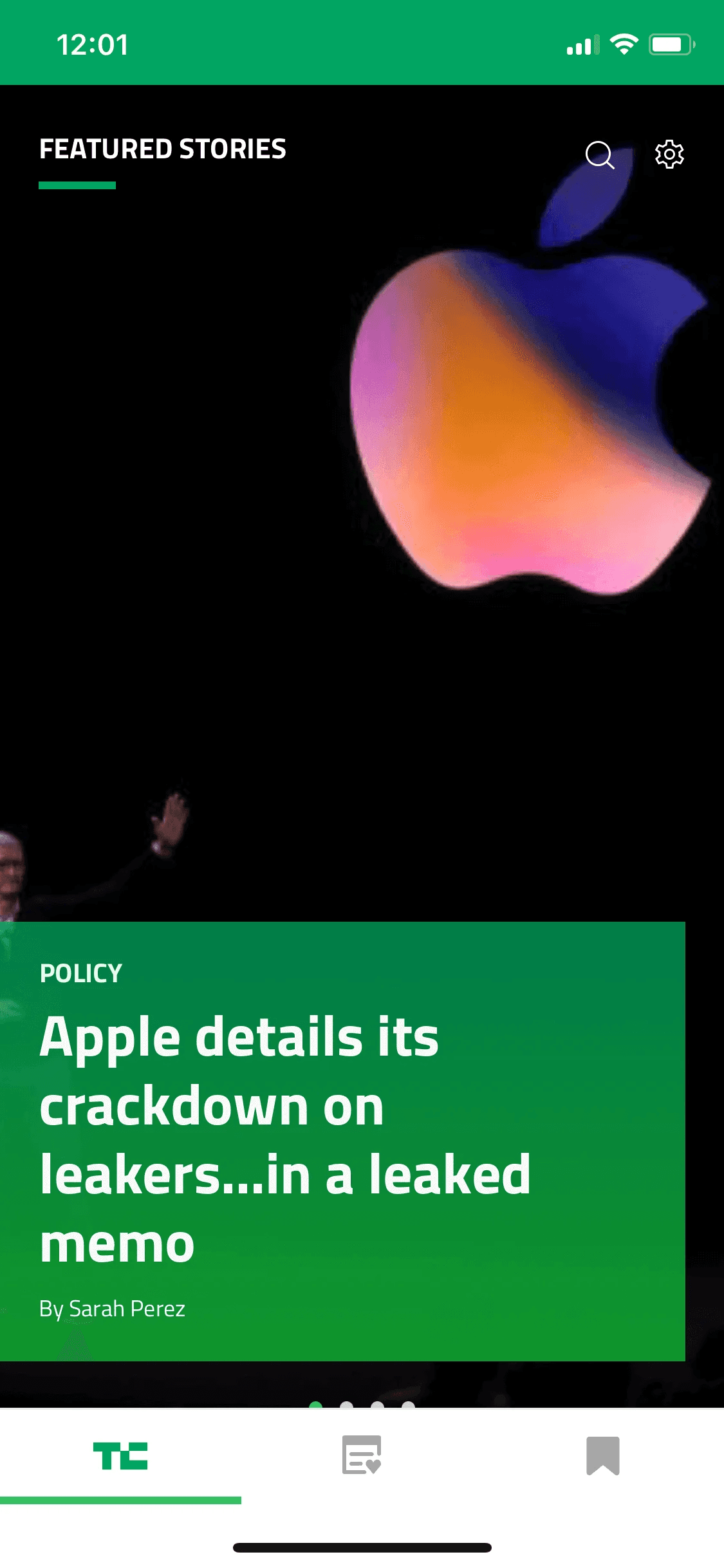
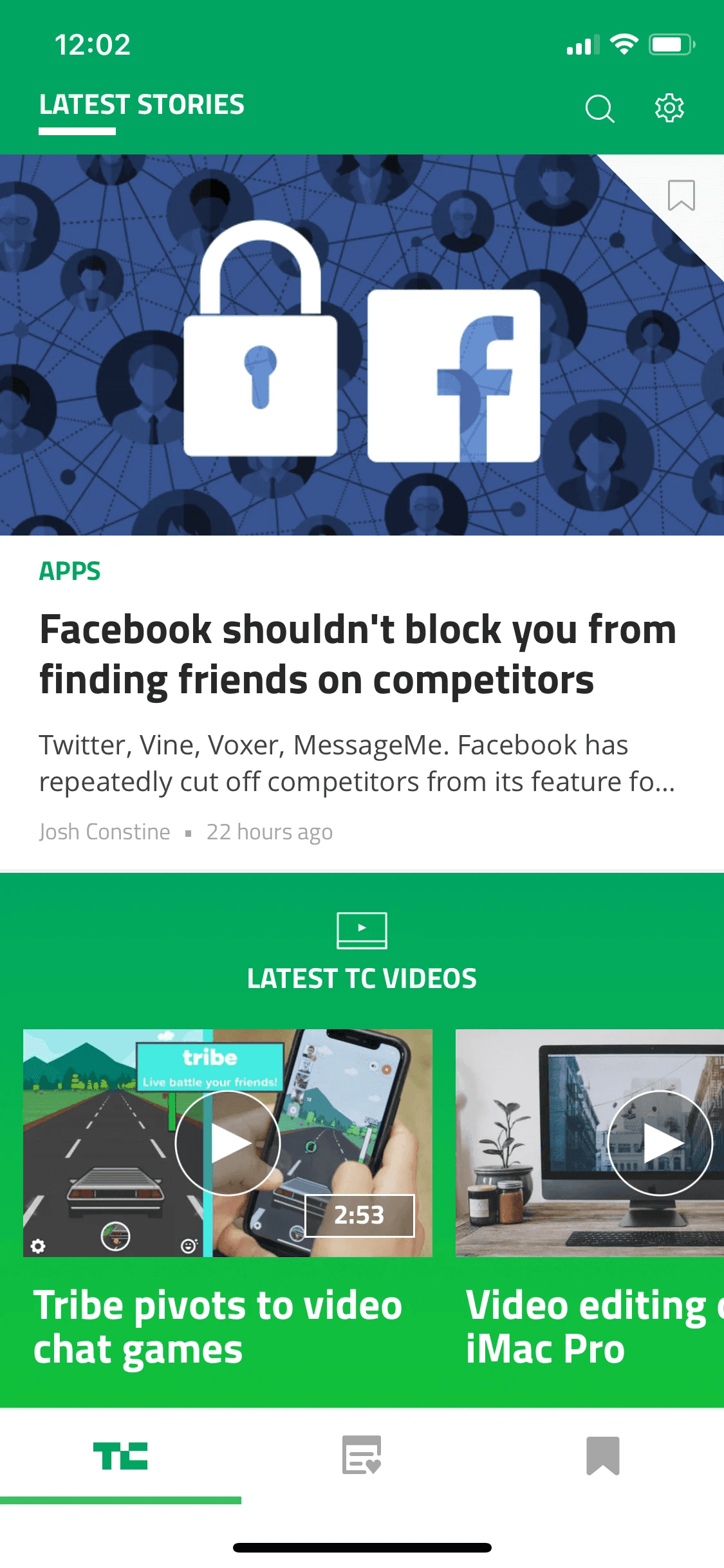
TechCrunch, a top tech news site, was formerly owned by media conglomerate AOL Inc. Its branding uses a distinct palette of Black, White, Green Haze, and Amber. On our page, you can easily copy these colors in Hex, CMYK, RGB, and more.
What are the main colors in TechCrunch's color palette?
We've found that TechCrunch's main color palette consists of a classic Black and White, their signature Green Haze, and a vibrant Amber. These colors work in tandem to create the bold, authoritative look you see across their brand.
What do the colors in TechCrunch's app or website represent?
TechCrunch's foundational black projects authority and seriousness, cementing its role as a definitive news source. The strategic pops of green and amber then inject a sense of innovation and forward-thinking energy, reflecting the dynamic startup world you're designing for.
How did TechCrunch's color scheme come about?
While the specific origin story isn't publicly detailed, TechCrunch's iconic green and minimalist palette were deliberately chosen to forge a distinct, energetic identity that stands out in the fast-paced world of tech media.
How does TechCrunch use color psychology in its interface designs?
In our view, TechCrunch masterfully uses its black and white palette for a clean, content-first experience, while the iconic green serves as a powerful accent to guide your focus toward key actions and interactive elements.
What are some other colors that complement TechCrunch's primary color?
To complement TechCrunch's bold black, we suggest exploring vibrant colors like an electric blue for a modern, energetic pop, or a deep crimson to introduce a sense of sophisticated impact and contrast.
What other brands and colors can I find on Mobbin?
On our brand colors page, you can explore curated color palettes from top companies. We also offer access to thousands of UI designs from various brands, providing endless inspiration for your next color combination.
How can Mobbin help me stay up-to-date with the latest UI/UX trends?
Mobbin keeps you at the forefront of design with our extensive, constantly updated library of mobile and web UI/UX patterns, showcasing the latest trends from color usage to complete user flows. By exploring how the best apps are designed, you can easily stay ahead of the curve and supercharge your creative process.
You can try Mobbin today for free for as long as you like, or get full access with any of our paid plans.
HEX
RGB
CMYK
HSB
HSL
#000000
0, 0, 0
0, 0, 0, 100
0°, 0%, 0%
0°, 0%, 0%
#ffffff
255, 255, 255
0, 0, 0, 0
0°, 0%, 100%
0°, 0%, 100%
#fdc006
253, 192, 6
0, 24, 98, 1
45°, 98%, 99%
45°, 98%, 51%
#00a562
0, 165, 98
100, 0, 41, 35
156°, 100%, 65%
156°, 100%, 32%
Access our full UI & UX library today.
What are the main colors in TechCrunch's color palette?
We've found that TechCrunch's main color palette consists of a classic Black and White, their signature Green Haze, and a vibrant Amber. These colors work in tandem to create the bold, authoritative look you see across their brand.
What do the colors in TechCrunch's app or website represent?
TechCrunch's foundational black projects authority and seriousness, cementing its role as a definitive news source. The strategic pops of green and amber then inject a sense of innovation and forward-thinking energy, reflecting the dynamic startup world you're designing for.
How did TechCrunch's color scheme come about?
While the specific origin story isn't publicly detailed, TechCrunch's iconic green and minimalist palette were deliberately chosen to forge a distinct, energetic identity that stands out in the fast-paced world of tech media.
How does TechCrunch use color psychology in its interface designs?
In our view, TechCrunch masterfully uses its black and white palette for a clean, content-first experience, while the iconic green serves as a powerful accent to guide your focus toward key actions and interactive elements.
What are some other colors that complement TechCrunch's primary color?
To complement TechCrunch's bold black, we suggest exploring vibrant colors like an electric blue for a modern, energetic pop, or a deep crimson to introduce a sense of sophisticated impact and contrast.
What other brands and colors can I find on Mobbin?
On our brand colors page, you can explore curated color palettes from top companies. We also offer access to thousands of UI designs from various brands, providing endless inspiration for your next color combination.
How can Mobbin help me stay up-to-date with the latest UI/UX trends?
Mobbin keeps you at the forefront of design with our extensive, constantly updated library of mobile and web UI/UX patterns, showcasing the latest trends from color usage to complete user flows. By exploring how the best apps are designed, you can easily stay ahead of the curve and supercharge your creative process.
You can try Mobbin today for free for as long as you like, or get full access with any of our paid plans.
From palette to product


Trending brand colors
Badoo
Date Honestly
Badoo
Date Honestly
Balance
Meditation that adapts to you.
Balance
Meditation that adapts to you.

Basecamp
JUST LET ME DO MY JOB.
Basecamp
JUST LET ME DO MY JOB.

BeReal.
Your daily dose of real life.
BeReal.
Your daily dose of real life.
Bear
Write beautifully.
Bear
Write beautifully.

Behance
Showcase and discover the latest work from top online portfolios by creative professionals across industries.
Behance
Showcase and discover the latest work from top online portfolios by creative professionals across industries.
Never run out of
inspiration again.
Use Mobbin for free as long as you like or get full access
with any of our paid plans.

Coinbase
Wise
Headspace
Airbnb

Uber
Nike

Pinterest
ChatGPT

Shopify
Loom
Creme

Mailchimp

Twitch

Spotify

Apple TV

Shop

Cosmos
Retro
Notion

Dropbox
Never run out of
inspiration again.
Use Mobbin for free as long as you like or get full access
with any of our paid plans.
Coinbase
Wise
Headspace
Airbnb
Uber
Nike
Pinterest
ChatGPT
Shopify
Loom
Creme
Mailchimp
Twitch
Spotify
Apple TV
Shop
Cosmos
Retro
Notion
Dropbox
Never run out of
inspiration again.
Use Mobbin for free as long as you like or get full access with any of our paid plans.
Coinbase
Wise
Headspace
Airbnb
Uber
Nike
Pinterest
ChatGPT
Shopify
Loom
Creme
Mailchimp
Twitch
Spotify
Apple TV
Shop
Cosmos
Retro
Notion
Dropbox
Never run out of
inspiration again.
Use Mobbin for free as long as you like or get full access
with any of our paid plans.
Coinbase
Wise
Headspace
Airbnb
Uber
Nike
Pinterest
ChatGPT
Shopify
Loom
Creme
Mailchimp
Twitch
Spotify
Apple TV
Shop
Cosmos
Retro
Notion
Dropbox